Navigate without
your mouse.
Introduction
Most navigation in Cannelle involves the top menu bar — hover a section, pick a link from the flyout, land on the page you need. It works fine. But if your hands are already on the keyboard, reaching for the mouse to navigate is a small friction that adds up across the day.
The command palette gives you a faster path. Press Cmd K on a Mac or Ctrl K on Windows and Linux, type a few letters, and go. No mouse required.
How it works
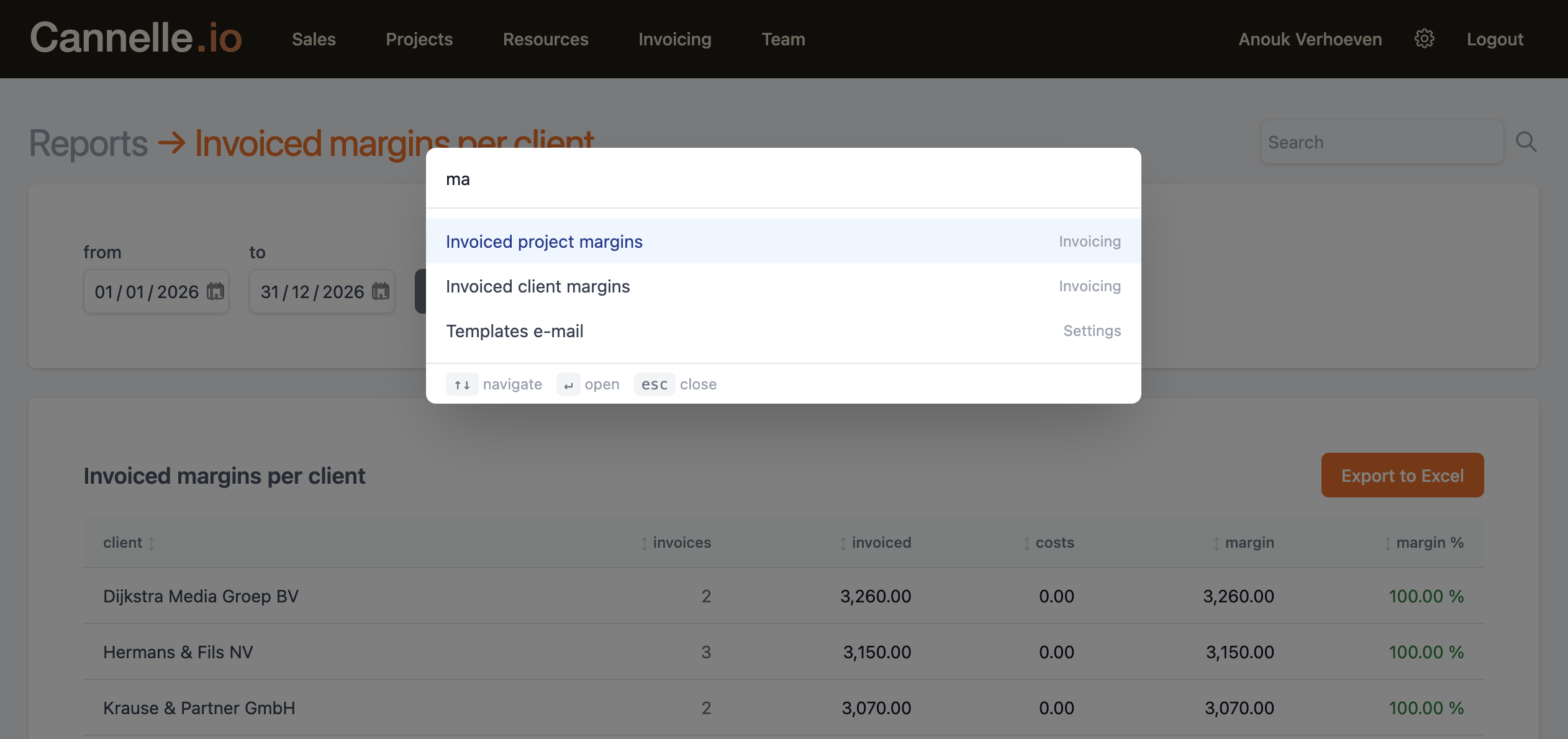
Press the shortcut and a search overlay appears in the centre of the screen. Start typing — the list filters instantly as you type, matching against both the page name and the section it belongs to. Once you see what you want, use the arrow keys to move to it and press Enter to navigate. Press Esc at any time to close it without leaving the page you are on.
Open or close the palette from anywhere in the application.
The list narrows in real time. Match by page name or by section — typing "invoice" surfaces every invoicing-related page at once.
Move through the filtered results without touching the mouse.
Navigate to the selected item immediately.
Close the palette and return to wherever you were.
What you will find
The palette mirrors the full navigation menu — every page available through the flyout menus is also reachable here. Items are grouped by the same sections you see in the nav bar.
Clients list, new client, following clients, open and cancelled quotes, sales report.
Open, unassigned, completed, cancelled and uninvoiced projects, task lists, workload report.
Resource search, active and following lists, intake, assessment and contracting stages, assignment reports.
Outbound and inbound invoices, recurring invoices, tracking, all invoicing reports and margin views.
Whiteboard and team availability calendar.
Company, task types, document templates, email templates, activity log, integrations.
Dashboard, your profile, global search.
The palette always shows the full list when the input is empty, so you can scroll through everything available if you are still finding your way around the application.
Tips & suggestions
A few ways to get more out of it once the shortcut becomes muscle memory.
// search by section, not just by page
Filtering matches against the group label as well as the page name. Type invoic and every invoicing-related page appears at once — outbound, inbound, recurring, tracking, all the reports. Useful when you know roughly where you are going but not the exact page name.
// use it as a shortcut to settings
Settings is tucked behind a gear icon in the top-right corner and easy to overlook. With the palette, type sett and all settings pages are immediately visible. Faster than hunting for the icon, especially on smaller screens.
// jump straight to reports
Cannelle has over a dozen reports spread across Sales, Projects, Invoicing, and Resources. They are not all visible in the nav at a glance. Type report in the palette to surface all of them in one filtered list — revenue, margins, load, payments, availability, and more.
// works from anywhere
The shortcut is registered globally — it works whether you are reading a client record, editing an invoice, or looking at a report. You do not need to scroll to the top or click away first. Press Cmd K, type, go.